
All Posts
Core Web Vitals 2026: Every Metric, Real Sales Impact, and Fix Ranked
Three seconds. That is roughly how long you have before most mobile visitors give up and leave.
Google's own research is blunt about it: as load time climbs from one second to three, the chance a visitor bounces jumps by about 32%. Push it to five seconds and the odds get much worse. Every one of those people was interested enough to click. Then your site made them wait, and they left before they saw a price or a product.
That is what a slow site costs you. Not just a lower Google rank, though it costs you that too. It costs you the sale from someone who was already at the door. This post covers what Core Web Vitals are, how they hit both your rank and your revenue, and the fixes that actually move the number.
What Core Web Vitals are
Core Web Vitals are three specific measurements Google uses to score how a real visitor experiences your page. Not lab numbers. Real users on real phones and connections.
There are three of them, and each answers a plain question.
LCP, does the page load fast?
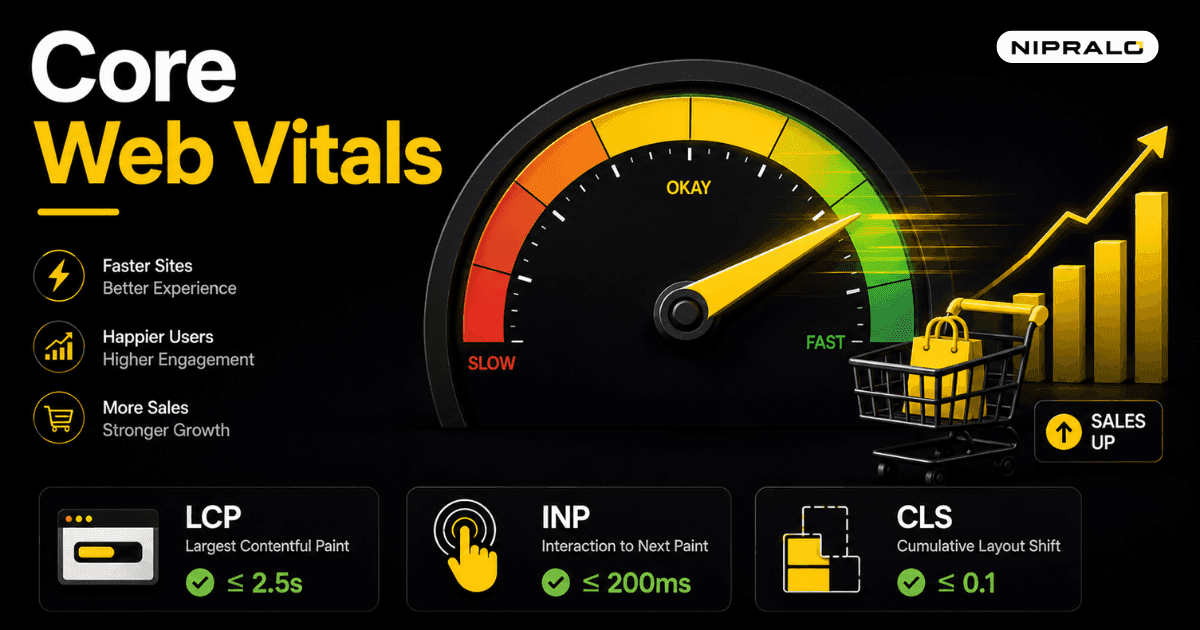
Largest Contentful Paint measures how long until the biggest thing on screen, usually the main image or headline, finishes loading. It answers "did the page show up quickly?" Google's good threshold is 2.5 seconds or less.
INP, does the page respond fast?
Interaction to Next Paint measures how quickly the page reacts when someone taps or clicks. It answers "when I do something, does anything happen?" A laggy button that ignores your tap for half a second is a bad INP. Good is 200 milliseconds or less.
One note that trips people up: in March 2024, Google replaced the old First Input Delay (FID) metric with INP. If a guide still talks about FID, it is out of date.
CLS, does the page stay still?
Cumulative Layout Shift measures how much the page jumps around as it loads. You go to tap a button, an ad loads above it, the button moves, you tap the wrong thing. That is layout shift, and it is maddening. Good is 0.1 or less.
Here are the three in one place.
Do Core Web Vitals affect Google ranking?
Yes. Google confirmed page experience, which includes Core Web Vitals, as a ranking signal. It is not the only signal, and great content on a slow page can still rank. But when two pages are close on everything else, the faster one wins.
So a slow site loses on two fronts at once. It ranks lower, so fewer people find it. And the people who do find it are more likely to bounce before they act. You pay twice for the same problem.
How a slow site actually loses you sales
Rank is the part everyone talks about. The bigger loss is quieter, and it happens on the page itself.
Think about the path a customer takes. They click. They wait. Every second of that wait, some of them leave. The ones who stay hit a checkout, a form, a "buy" button. If that button lags, or the page jumps as they reach for it, some of them give up right there.
- Waiting kills clicks. The 32% bounce jump from one to three seconds is people who were already interested.
- Lag kills trust. A slow, janky checkout feels unsafe. People do not hand over card details to a site that feels broken.
- Layout shift kills the tap. A button that moves at the wrong moment sends people to the wrong place, or nowhere.
None of this shows up as an error. Your site "works". It just leaks customers, quietly, every day. This is exactly the kind of problem a free site audit is built to catch.
A real example
A Mumbai retailer came to us with steady traffic but weak online sales. The site was not broken. It was slow. The main product image took over four seconds to load on mobile, and the page shifted as banners came in. People were landing, waiting, and leaving. Tightening the images and stabilising the layout brought load time under the line, and the same traffic started converting better. Nothing about the traffic changed. Only the speed did.
What is a good page load time?
Aim for your main content to appear in under 2.5 seconds on a mid-range phone on mobile data, not your office wifi. That is the real test. Your site feels fast to you because you load it on fast devices and cached connections. Your customer does not.
How to check and improve your Core Web Vitals
You do not have to guess at any of this. Two free Google tools tell you exactly where you stand.
- Run PageSpeed Insights. Go to PageSpeed Insights, paste your URL, and read the report. It gives you real-user scores plus a specific list of what to fix.
- Check Search Console. The Core Web Vitals report in Google Search Console shows which pages across your whole site are failing, grouped by issue.
- Fix the images first. Oversized images are the most common cause of slow LCP. Compress them and serve modern formats. This alone fixes many sites.
- Cut the heavy scripts. Too many third-party tags, chat widgets, and trackers slow response and hurt INP. Keep only what earns its place.
- Reserve space for elements. Set fixed sizes for images and ad slots so nothing jumps as it loads. That fixes CLS.
Most of these are one-time fixes with lasting payoff. If your site runs on a heavy template or an aging build, the faster route is often a proper rebuild rather than patching. That is a core part of our web development work, and you can see the full range on our services page. For the technical deep dive, web.dev's Core Web Vitals guide is the source of record.
The short version
Core Web Vitals measure three things: does your page load fast, respond fast, and stay still. Google uses them to rank you, and your customers use them, without knowing the names, to decide whether to stay. A slow site loses on both. The fixes are known, mostly one-time, and they pay back in rank and in sales. Check your numbers first. Then fix what the report tells you.
Think your site speed is costing you sales?
Book a free 20-minute call. Our team will run your Core Web Vitals, show you exactly what is slowing the site down, and tell you what is worth fixing
Frequently Asked Questions
What are Core Web Vitals in simple terms?

Core Web Vitals are three measurements Google uses to score how real visitors experience your page. They cover how fast the page loads, how quickly it responds to taps, and how stable it stays while loading. Together they measure whether your site feels fast and smooth to use.
Do Core Web Vitals affect Google ranking?
Yes. Google confirmed Core Web Vitals as part of its page experience ranking signal. They are not the only factor, and strong content still matters most, but when two pages are otherwise close, the faster one tends to rank higher.
How does site speed affect sales and conversions?
A slow site loses customers before they buy. Google found the chance of a bounce rises about 32% as load time goes from one to three seconds. Slow, laggy, or jumpy pages also erode trust at the checkout, so people abandon purchases they were ready to make.
What is a good page load time?
Aim for your main content to appear in under 2.5 seconds, tested on a mid-range phone using mobile data rather than fast office wifi. That reflects how most real customers actually experience your site, which is often slower than it feels to you
How do I check and improve my Core Web Vitals
Use two free Google tools: PageSpeed Insights for a single page and the Core Web Vitals report in Search Console for your whole site. Both tell you what to fix. The most common wins are compressing large images, cutting heavy third-party scripts, and reserving space for elements so the layout does not shift.