
All Posts
What to Automate First: 8 Processes, Payback Timelines, and Failure Rates Compared
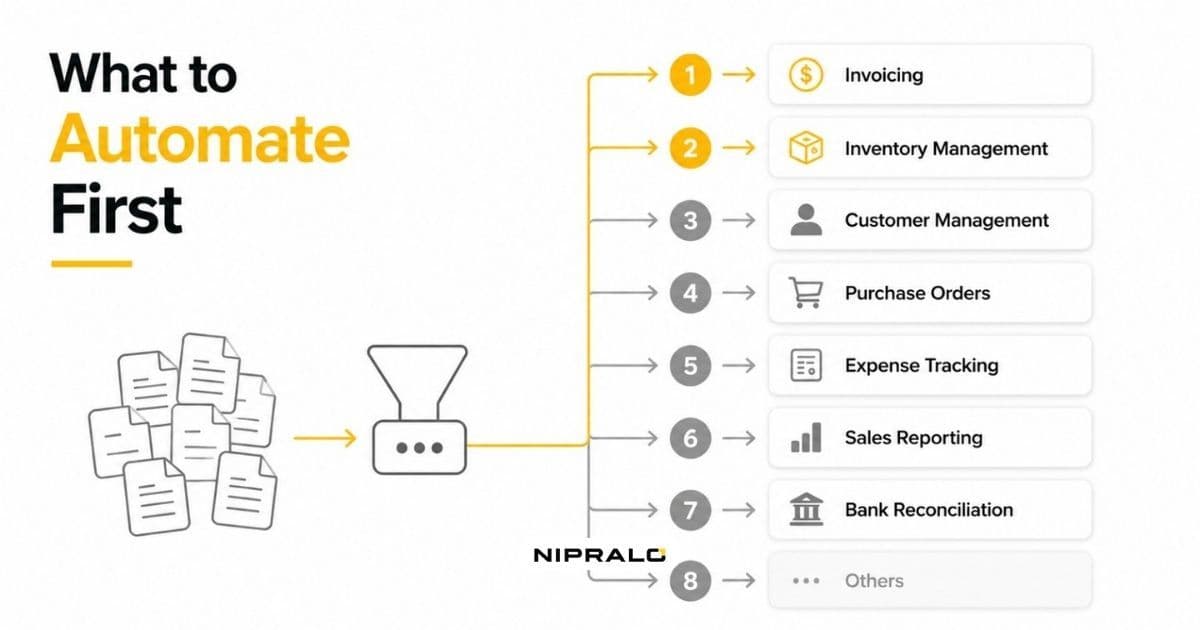
Most businesses do not fail at automation. They fail at picking what to automate first.
The numbers back that up, and they are not flattering. EY puts RPA implementation and adoption failure at 30% to 50%, while a Deloitte survey of 400 global firms found 63% missed their delivery deadlines and only 3% ever scaled past fifty bots.
That is not a technology problem. Those tools work. It is a sequencing problem: teams automate the process that annoys them most instead of the one that pays back fastest.
So this is a guide to order, not tools. What to automate first, what to automate third, and what to leave alone entirely.
The rule that decides everything
Automation pays back when the process is high volume, rule-heavy, and stable. It rarely pays back when the process is low volume or judgement-heavy, no matter how irritating it is.
Three questions per process. That is the whole filter.
How often does it run? Fifty times a week beats five. Volume is the numerator in every ROI calculation you will do.
Can you write the rules down? If a person applies judgement at any step, you are automating a decision, not a task. Those projects are longer and riskier.
Has it changed in the last six months? Automating a process that is still evolving means building it twice.
Score each process out of three. Anything scoring three goes to the front of the queue. Anything scoring one gets fixed manually first, then reconsidered later.
The 8 processes worth automating, in rough order
This ordering comes from what our team sees deliver for growing businesses, cross-checked against where the research says returns actually cluster. Forrester's data points the same way: high-volume repetitive work like data entry, invoicing and audit documentation produces the largest per-employee savings, up to 200 hours a year in strong implementations.
1. Invoicing and payment reminders
Highest volume, clearest rules, fastest payback. It also touches cash directly, which makes the business case easy to defend upstairs.
In India this one is unusually well served. GST-compliant billing tools generate invoices, push them over WhatsApp with a UPI link attached, and chase payment on a schedule without anyone remembering to. The compliance side comes bundled rather than bolted on.
If you automate exactly one thing this year, make it this.
2. Data entry between systems
Every time someone exports a CSV, cleans it, and uploads it somewhere else, you are paying a person to be an integration layer.
This is usually the cheapest fix on the list. Two tools, one connector, done in a fortnight. It also removes an entire category of copy-paste error rather than just reducing it.
3. Lead capture and follow-up
Enquiries arriving across WhatsApp, a website form, Instagram DMs and someone's personal phone is normal, and it leaks revenue quietly.
Routing every enquiry into one place, tagging it, and triggering a first response within minutes is not sophisticated work. But speed of first response moves conversion more than almost anything else you can change this quarter.
4. Reporting and dashboards
If someone rebuilds the same report every month, that report should build itself.
The gain here is not the saved hours, it is the timing. Numbers that arrive on Monday can change the week. Numbers that arrive on the 8th describe a month you can no longer influence.
5. Onboarding, staff or client
Same checklist, same documents, same welcome sequence, every single time. Textbook rule-heavy work.
The volume is lower than invoicing, so payback is slower. But it removes the "we forgot to send them X" failure that customers actually notice.
6. Inventory and reorder alerts
Only worth it once you hold real stock across more than one location. Below that threshold a person with a spreadsheet genuinely is fine.
Above it, the cost of a stock-out or dead capital sitting in a warehouse dwarfs the cost of the automation.
7. Approvals and internal requests
Leave requests, purchase orders, discount approvals. High friction, moderate volume.
Worth doing mainly because it converts rules that live in people's heads into rules the system enforces. That is a governance win as much as a time win.
8. Customer support responses
Last on this list deliberately, despite being first on most vendor lists.
Automating the top ten repeat questions is genuinely valuable. Automating the whole support function is where businesses damage relationships they spent years building. Start narrow, keep a human escape hatch, and measure complaints rather than deflection rate.
What not to automate
This section matters more than the last one, because the expensive mistakes live here.
Anything that changes every month. You will build it twice, and the second build always costs more than the first because now there is migration.
Low-volume work, however annoying. A task that runs four times a month is not worth a build. Ten minutes of irritation is not a business case. Write a checklist instead.
Judgement calls dressed up as rules. Deciding which client gets a discount, which candidate to shortlist, which supplier to drop. You can support these decisions with better data. Handing them over entirely is how businesses end up with confident, consistent, wrong answers.
Anything nobody will own. Automations rot. Tools change their APIs, someone renames a field, and the flow fails silently for three weeks before anyone notices. If no named person owns it, do not build it.
A broken process. Automating a bad workflow gets you a bad workflow running faster and with fewer witnesses. Fix the process on paper first. If it does not work manually, it will not work automatically.
No-code or custom? Both, at different points
The honest answer is that this is a staging question, not a philosophy question.
Start no-code. Zapier, Make, Power Automate, or the automation already sitting unused inside your CRM. Cheap, fast, and reversible. Most first automations should live here, and plenty should stay here permanently.
Move to custom when three things are true: the flow has become business-critical, the per-task pricing has quietly overtaken a build, or the logic has outgrown what a visual builder can express without becoming unmaintainable.
Our team's usual advice is to prove the workflow with no-code for a quarter, then rebuild the ones that survived. Surviving is the test. Roughly half of what gets built in month one is abandoned by month four, and you would rather discover that on a subscription than on an invoice.
Not sure which process to automate first?
Book a free 20-minute call. Bring your three most repetitive processes and our team will score them on volume, rules, and effort, then tell you which one to start with and roughly what it takes. No deck, no pressure.
Frequently Asked Questions
What business processes should you automate first?

Start with the process that runs most often, follows rules you can write down, and has not changed in the last six months. For most growing businesses that means invoicing and payment reminders, followed by manual data entry between systems. Both are high volume and rule-heavy, which is where automation returns cluster.
How do you calculate ROI on business automation?
Measure the current process before you build anything. Count how many times it runs per week, how many minutes each run takes, and who performs it, then multiply out to an annual cost using a loaded hourly rate. Compare that against the build cost plus ongoing maintenance. Without a measured baseline you will not be able to prove the return later, which is the most common reason automation projects lose funding.
Which tasks should never be automated?
Avoid automating processes that change frequently, run only a handful of times a month, or depend on human judgement such as deciding which client gets a discount or which candidate to shortlist. Also avoid automating any process that nobody will own afterwards, since automations fail silently when APIs or field names change. Fix a broken process manually before automating it.
Should a small business use no-code tools like Zapier or build custom automation?
Use both, at different stages. Start with no-code tools to prove the workflow is worth keeping, since they are cheap, fast and easy to reverse. Move to a custom build once the flow becomes business-critical, once per-task pricing overtakes the cost of building, or once the logic gets too complex for a visual builder to handle cleanly.
Why do most automation projects fail?
Poor process selection and weak ownership, not the technology. Industry research places RPA implementation and adoption failure between 30 and 50 percent, with a majority of firms missing delivery deadlines. Projects usually fail because teams automate the process that annoys them most rather than the one with the highest volume and clearest rules, and because nobody measured the baseline or owns the automation after launch.